Written by Denys Havryliak
Swift vs React Native: RAM, CPU and the Cost of Two Runtimes
React Native keeps a JavaScript heap alive next to native views, and Hermes has no JIT by design. What that costs in memory and CPU, measured — including Shopify’s production data.
The short version
- React Native runs two memory systems at once: its own JavaScript engine, and the native views under it. In one peer-reviewed study it used more memory than any other framework tested
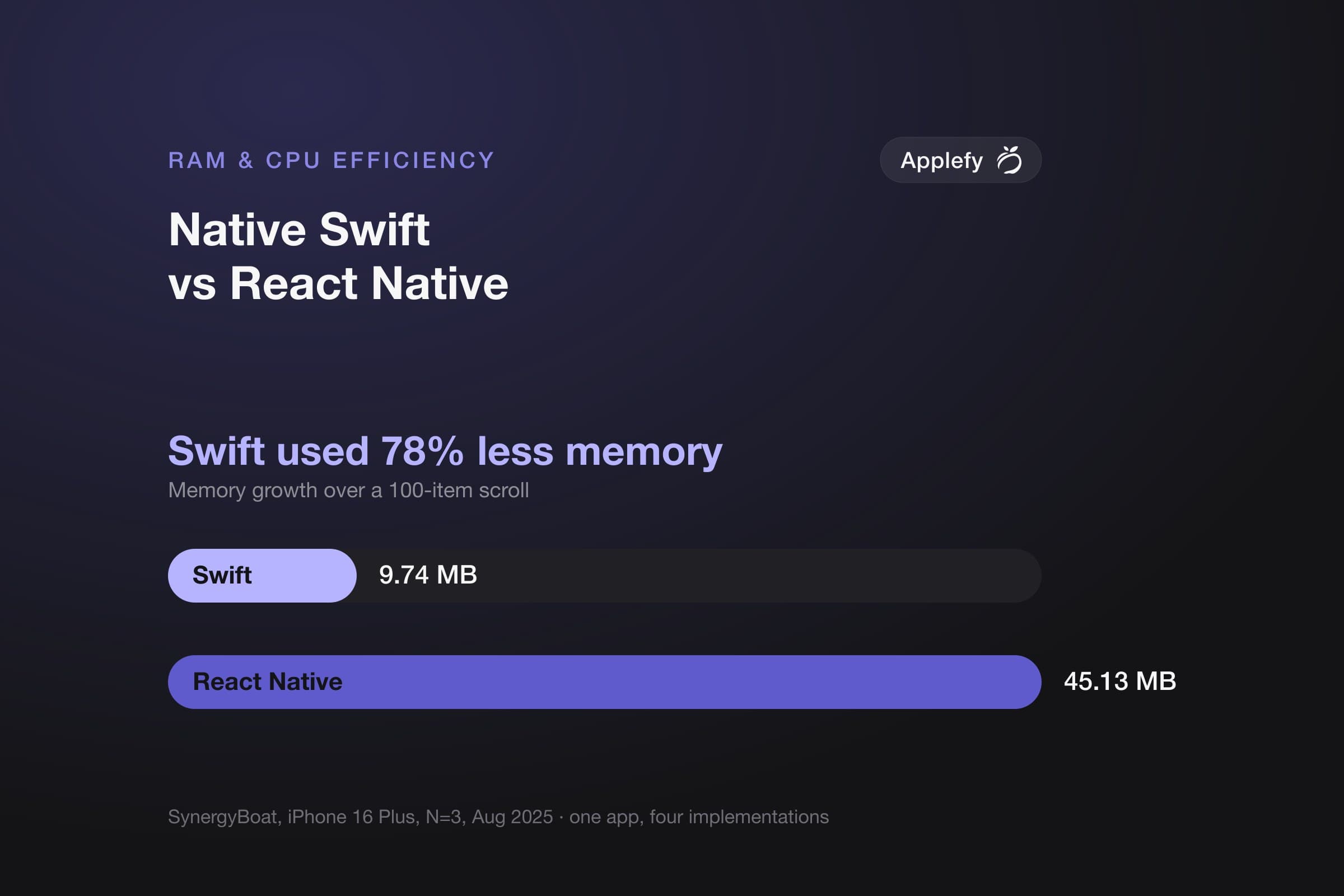
- One scroll through a list added 9.74 MB in Swift against 45.13 MB in React Native, about 78% less. It was also the least predictable result in the test, swinging by a quarter of its own average between runs
- Memory decides whether your app survives a session. iPhones do not slow a heavy app down, they shut it down, heaviest first. Your customer sees an empty basket, not a crash
- Shopify's own migration is the most honest public datapoint. Opening got about 3% faster on iPhone — and some complex screens got up to 20% slower, with crash-free sessions below their target for weeks
- It is not slower at everything. In one continuous-animation test it used less processor and less battery than the native version
- Widgets are Swift regardless. They run under a limit React Native's own documentation says its memory use is likely too high to fit inside
- Your existing team may outweigh all of this. If you already employ React developers, shipping this quarter can beat being four times lighter next year
We ship both native Swift and React Native. This is the comparison we actually run internally before we start a project.
How much less efficient is React Native than native Swift?
On memory, meaningfully — React Native keeps a JavaScript heap alive alongside native UIKit or SwiftUI objects, so you pay for two memory managers where Swift pays for one. On CPU, it depends entirely on the workload: Hermes runs bytecode in an interpreter with no JIT, which is fine for typical app logic and poor for sustained number-crunching. In production at Shopify's scale, the difference showed up as single-digit launch-time changes and occasional 20% regressions on complex screens.
Every number below carries the device, framework version and tool it came from. We name the numbers that lack those at the end. We do not use them.
What does that memory number actually cost you?
An iPhone does not slow an app down when memory runs short — it shuts the app down, heaviest app first. Your customer does not see a crash. They switch to another app for twenty seconds, come back, and find an empty basket and a login screen. It is the least understood cost of a heavier app, and it never appears in your crash reports.
We wrote that up separately, with the widget ceiling that stops some features being buildable at all: Why iPhones shut down heavy apps first.
Every number we could verify, in one table
Four things people ask about — memory, processor use, download size, and how quickly the app opens. Here is what has actually been measured, and what has not.
Read the right-hand column before using any row. And read the rows that say nobody has published this, because there are more of them than anyone selling you a framework will admit.
One flashcard app, built both ways and run on an iPhone, is the only public test that puts native Swift beside React Native. It covers memory. For the other three questions, no such test has been published.
| What was measured | Native Swift | React Native | Who measured it, and on what |
|---|---|---|---|
| Memory — the one question with a real answer | |||
| Extra memory the app took while scrolling a long list | 9.74 MB | 45.13 MB | SynergyBoat, August 2025. The same app built both ways, iPhone 16 Plus, three runs each |
| The same figure, next to Swift | the baseline | 4.6× more | Worked out from the row above — Swift used about 78% less memory |
| How much the result moved between runs | ± 0.18 | ± 10.94 | Same test, and this row matters as much as the one above. React Native did not just use more — it was wildly less predictable, swinging by about a quarter of its own average. Read it as “roughly four to five times”, not exactly 4.6 |
| Memory against a native app, on Android | no Swift on Android | the highest of any framework tested | Oliveira and colleagues, 2023, the one peer-reviewed study here. Android, and the native app compared against was Java. A direction, not an iPhone number |
| Older iPhone figures still quoted today | 48 MB | 135 MB | inVerita, June 2020, iPhone 6s — measured before React Native changed both its JavaScript engine and its entire architecture. Listed so you recognize it when quoted as current |
| Processor use — no iPhone test includes Swift | |||
| iPhone, same app, both ways | nobody has published this | nobody has published this | We looked hard and found none |
| Against a native app, on Android | no Swift on Android | highest overhead of the frameworks tested — but lower than native in one continuous-animation app | The same peer-reviewed study. That exception is real and worth knowing: React Native is not slower at everything |
| Download size — what your customer waits for | |||
| A bare-bones app, as downloaded on iPhone | nobody has published this | nobody has published this | Neither Apple nor the React Native team publishes a comparable empty-app figure for iPhone |
| Machinery the app carries just to run | none — it uses what is already on the phone | a JavaScript engine, about 2.4 MB | Callstack's measurements on iPhone. This is the structural difference: your app ships a second runtime and keeps it in memory alongside the native one |
| How fast the app opens — nothing comparable exists | |||
| Cold start on iPhone, same app | nobody has published this | nobody has published this | The one open-source project that publishes opening speed against a real Swift app has no React Native version in it |
Every row is sourced in Sources, with exact hardware, versions and tools. The rows saying nobody has published this are the finding, not a gap we failed to fill.
Numbers that look like comparisons but are not
These three come up in almost every argument for React Native. Each measures React Native against an older version of itself. None involves Swift. If one is quoted to you as a reason to skip native, it has answered a different question.
| What gets said | What was actually compared | The detail that gets left out |
|---|---|---|
| “It starts about 40% faster now” | Two JavaScript engines, against each other | Callstack, on iPhone, at React Native 0.64. Memory fell about 18% — and the app got 2.4 MB bigger |
| “The New Architecture fixed performance” | React Native 0.76 against 0.75 | Its own release notes, on Android: about 3.8 MB smaller, opening about 15 milliseconds quicker. No memory figure was published at all |
| “Shopify proved it is production-ready” | Shopify's own apps, before and after their upgrade | Shopify, September 2025: ~10% faster opening on Android, ~3% on iPhone — alongside some screens up to 20% slower, more freezes on both platforms, and crash-free sessions below their own target for a couple of weeks |
Should you choose Swift or React Native?
Efficiency is one input, and rarely the deciding one. The honest trade-off: native Swift wins the measurement, and native costs more the moment you need Android too — because there is no second platform included in the price.
What to build, and what each answer costs you. The last column is the one people skip.
| If this is your situation | Build this | Why | What it costs you |
|---|---|---|---|
| iPhone only, no Android planned | Native Swift | Around a quarter of the memory growth, every Apple feature on day one, and no second runtime in the download | Nothing extra. With one platform, native is also the cheaper option — one codebase and no framework layer between you and the bugs |
| Both platforms, and efficiency is the product — background audio, camera, maps, on-device AI, or customers on older phones | Native on both | This is where the memory gap stops being a statistic and starts shutting your app down mid-session | The expensive answer, honestly. Two codebases: every screen built twice. Design, backend, product and testing are not duplicated, so it is well short of paying twice — but the app layer genuinely is |
| You already employ a React and TypeScript team | React Native | The team you have is a bigger asset than a benchmark. Shipping this quarter beats being four times lighter next year | The heaviest and least predictable result in the only iPhone test that includes Swift. Worth revisiting if the app becomes performance-sensitive |
| Both platforms, ordinary content, booking or shop app, budget is binding | React Native | One team covering both platforms is a real saving, and for an app that shows lists and forms the gap may never reach your customers | A much heavier app. Budget to test on the oldest phone you support, not the newest — that is where it shows |
| Widgets or Live Activities matter to the product | Swift, whatever else you choose | React Native's own documentation says its memory use is likely too high to fit inside these budgets | Not really a choice. Plan for Swift on the team from the start rather than finding out late |
Sources
Every figure above comes from one of these. Each entry states the conditions that make it citable: device, versions, tool, sample size. A number without them is not evidence.
The measurements
- SynergyBoat — “Flutter vs React Native vs Native: 2025 Performance Benchmark” (31 August 2025)The ΔMemory figures. iPhone 16 Plus, N=3, RSS growth over a 100-item scroll. Vendor-published. We use its memory arm only; its frame-time comparison measures different quantities against one budget.
- Oliveira, Moraes, Castor & Fernandes — “Analyzing the Resource Usage Overhead of Mobile App Development Frameworks” (EASE 2023)Peer-reviewed. Samsung Galaxy S20 FE, Android 12,
adb batterystats+meminfo, 45 runs per benchmark with the first 15 discarded. Flutter 3.0.3 (Skia), React Native 0.68.2 (Hermes disabled), against native Java. No iOS, no Swift. Open-access PDF via Utrecht University; DOI 10.1145/3593434.3593487. - Shopify Engineering — “Migrating to React Native’s New Architecture” (5 September 2025)Production data from Shopify Mobile and Point of Sale. Reports its regressions as well as its wins, which is why we use it.
- React Native — “Toward Hermes being the default”Carries the Callstack/Mattermost iOS numbers: startup ~40% faster, memory ~18% lower, app +2.4 MiB, at React Native 0.64.
- Callstack — “Hermes performance on iOS”The original Mattermost measurements behind those figures.
First-party documentation
- Apple — “iOS Memory Deep Dive”, WWDC18 session 416Defines an app’s memory footprint as dirty + compressed pages, counted in 16 KB pages. States the footprint limit is device-dependent and never publishes a number.
- Apple — “Identifying high-memory use with jetsam event reports”The worked example we quote: 92,802 pages × 16,384 bytes = 1.52 GB in use at a
per-process-limittermination. That is usage at death, not a published ceiling. - Apple Developer Forums —
EXC_RESOURCE RESOURCE_TYPE_MEMORY (limit=30 MB)Developer-reported WidgetKit crash logs, not an Apple specification. The source for the ~30 MB widget ceiling. - Meta Engineering — “Hermes: An open source JavaScript engine optimized for mobile apps” (2019)Why Hermes ships no JIT: warm-up hurts time-to-interactive, and a JIT costs code size and memory.
- facebook/hermes issue #1829 — memory consumption in Hermes V1A Meta maintainer explaining that HV32 uses ~40% less memory but needs memory-mapping unavailable on iOS, so Hermes V1 ships HV64 there. Applies from React Native 0.84 (February 2026).
- React Native 0.70 release notes (5 September 2022)Hermes becomes the default engine.
- React Native — “The New Architecture is Here” (23 October 2024)Fabric, TurboModules and bridgeless by default. Also the source for the fact that the legacy bridge remains in 0.76 for compatibility.
- React Native 0.76 release notesThe only official figures: Android APK ~3.8 MB smaller (20%), median startup ~15 ms (~8%) faster. No memory figure was published.
- React Native — app extensions documentationReact Native’s own warning that its memory use “tends to be too high” for the tightest extension budgets. Note the page still discusses the 16 MB Today widget, which Apple removed in iOS 18.
Open source you can run yourself
- SynergyBoat benchmark sourceAll four implementations — Swift, Flutter, React Native, Kotlin — with the instrumentation. Clone and re-run it.
- EASE 2023 replication packageEvery raw
adbdump behind the paper. Re-runnable. - RNArchBench — React Native Legacy vs New ArchitectureReact Native 0.81.5 with a native Kotlin baseline, reproducible analysis pipeline. Android only, and its authors call their own CPU and RAM fields descriptive rather than inferential.
- jacobras/flutter-vs-native-vs-kmpOne app in four stacks including a native Swift/SwiftUI baseline. Publishes app size and startup only — no RAM or CPU. Archived August 2026.
Sources we checked and did not use
- inVerita — “Deep Performance Comparison” (June 2020)The origin of the “48 MB / 117 MB / 135 MB” figures. iPhone 6s and a 2014 iPad mini 3, before Hermes, Impeller and the New Architecture. Linked so the claim is checkable, not as a recommendation.
- inVerita — “Examining Performance” (March 2020)The pi-digit microbenchmarks behind “Flutter is 15% faster than Swift”. Measures arithmetic in a loop, on an iPhone 6s.
For how Flutter fits in, see the three-way comparison or Swift vs Flutter. If you want this decision made against a specific product rather than in the abstract, talk to us.
Related articles
- Native Swift vs Flutter vs React Native: RAM, CPU and Real EfficiencyDevelopment
- Swift vs Flutter: RAM, CPU and What the Measurements Actually SayDevelopment
- Native iOS vs React Native: Which to Choose for Your iPhone App (2026)Development