Written by Denys Havryliak
Why Claude Max Runs Out So Fast — and How to Make It Last
Claude counts tokens, not messages — and every message re-sends your whole chat. Why that makes long conversations expensive, and the habits that make a Max subscription last, in plain English.
The short version
- Claude counts tokens, not messages. Two people can send the same number of messages and one of them runs out far sooner
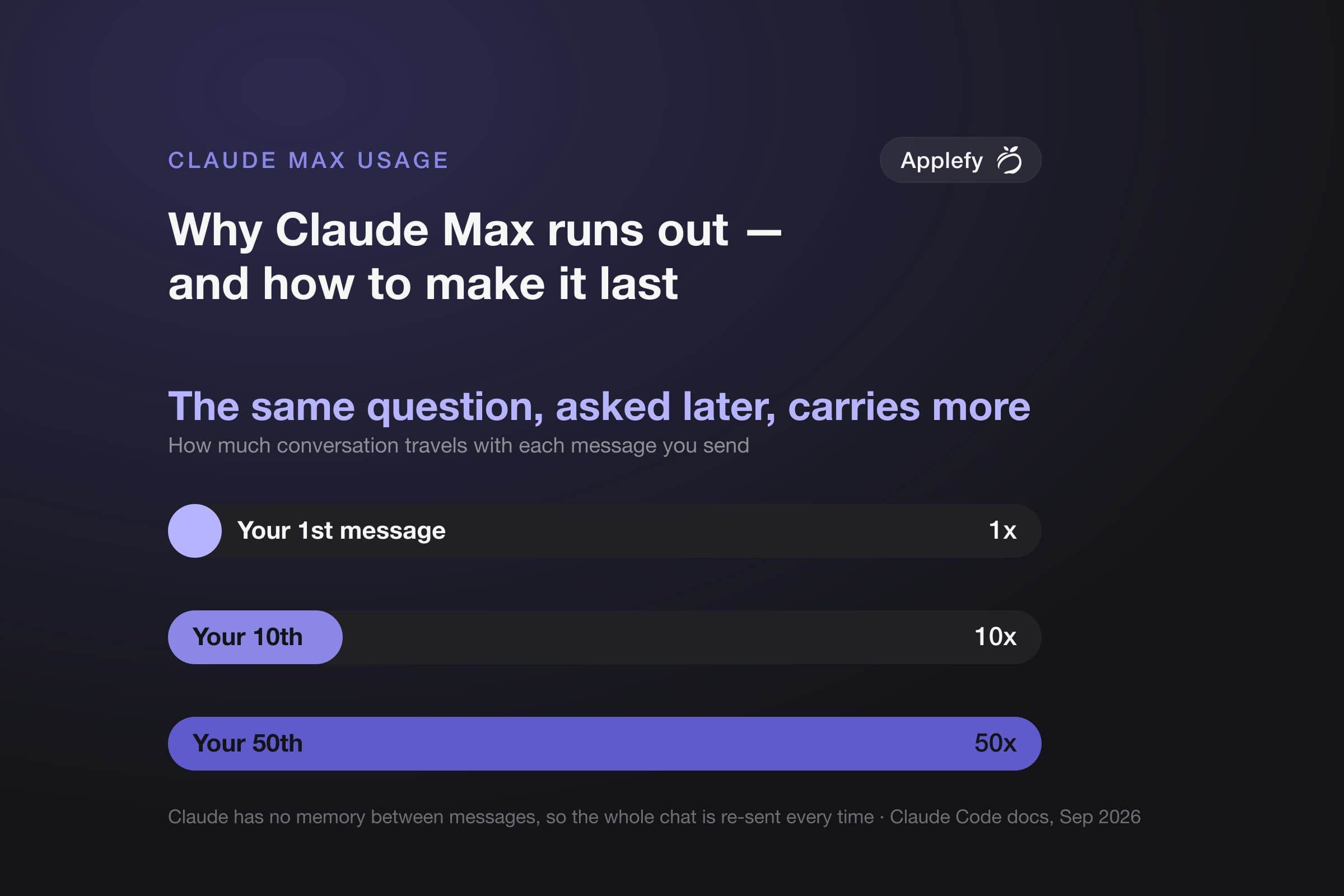
- Every message re-sends the whole chat. Claude has no memory between messages, so it gets sent the entire conversation again each time. By message fifty, Claude is re-reading the first forty-nine all over again
- Starting a fresh chat is free. It is the single most effective habit, and it costs you nothing
- Coming back after a long break costs extra. Claude keeps a cheap copy of your chat for an hour. After that, your next message pays full price for the whole thing
- Anthropic does not publish how much Max gives you. There is no official number of tokens or messages, at any price. Anyone quoting you one made it up
We build products with Claude every day, on Max subscriptions, and we hit these limits before we understood them. Everything below comes from Anthropic's own documentation, linked at the end. The habits are ours.
Why does Claude Max run out so fast?
Picture replying to an email, and stapling a photocopy of the entire thread behind every reply you send. The stack gets thicker each time. You are charged by the page — even when your new message is one line.
That is how Claude works. It does not remember your chat between messages, so the whole thing is sent again each time you write. Your usage tracks how long the conversation is, not how much you asked for.
Every habit below is just a different way of keeping that stack of paper thin.
What Anthropic actually tells you about the limits
Start here, because most advice on this topic is built on numbers nobody ever published. This is the whole public picture.
What is documented about the Max plan, and what simply is not available anywhere. The blank rows are the point, not something we failed to look up.
| What people want to know | What Anthropic actually says | Where |
|---|---|---|
| Published | ||
| Price | $100/mo for Max 5x, $200/mo for Max 20x | What is the Max plan? — web prices; the app stores charge differently |
| How often it resets | A limit that "will reset every five hours", plus a weekly limit "that applies across all models" | Same page. Your weekly reset happens at a fixed time tied to your account |
| How much you get | Max 5x is "five times more usage per session than the Pro plan". Max 20x is "20 times" | Same page — and that is the entire answer they give |
| A change worth knowing about | The five-hour limits for Claude Code were doubled. Separately, Pro and Max no longer get smaller limits at peak hours | Anthropic, 6 May 2026. If you read that your limit runs out faster during busy hours, that is out of date |
| Not published anywhere | ||
| How many tokens you get in five hours | no figure published | Pro has no published number either, so "five times Pro" multiplies out to nothing you can actually count |
| How many you get in a week | no figure published | Same reason |
| How much of it each model uses up | no figure published | The limits are real — Claude will tell you when you have hit one — but the thresholds are not documented |
One thing worth knowing when you do hit a wall. If the message says you hit your session or weekly limit, switching models will not help — that limit covers all of them. If it names a specific model, switching to a different one does keep you working. The message tells you which.
The four things that burn your usage
Anthropic published these in order of impact in August 2026, and the order surprises most people:
1. How long your chat is. 2. How many back-and-forths it takes. 3. Which model you picked. 4. How hard it is thinking.
Nearly everyone tries to fix number three first, by switching to a cheaper model. It is third on the list for a reason.
The model does matter. Opus costs several times more per message than Sonnet, and Sonnet more than Haiku. But a cheap model dragging a huge chat behind it will still cost you more than an expensive model in a chat you just started. Length wins.
When to start fresh, and when to summarize
This is the decision you make most often, and it has a clear answer. Claude gives you two ways to clear space, and they cost wildly different amounts.
Type these into Claude Code. Both free up space. Only one of them is free.
/clear | /compact | |
|---|---|---|
| What it does | Throws the chat away and starts over | Replaces the chat with a short summary and carries on |
| What it costs | Nothing | Claude has to read the whole chat to summarize it — so it is a big message in itself |
| Use it when | You have finished, and the next thing is unrelated | You are in the middle of something and need the thread, but not every detail |
Most people reach for /compact when they have actually finished and want /clear — paying for a summary of work nobody is coming back to.
If you do want to summarize, do it before you walk away, not after. Within that hour, summarizing costs a fraction of what you would expect. Come back the next morning and do it, and Claude re-reads the whole thing at full price first.
The habits that save the most
In order of how much difference they make. The first group matters more than the other two put together.
Everything here is documented by Anthropic. Where they do not publish how much it saves, this says so instead of guessing.
| Habit | Why it works | What is known |
|---|---|---|
| Keep the chat short — by far the biggest | ||
| Start a fresh chat between jobs | Leave one open all day and every message carries the whole day behind it | Costs nothing to do. Type /rename first if you want to find the chat again, and /resume to go back to it |
| Send big searches somewhere else | Say "use a subagent to find X". The searching happens in its own space and only the answer comes back | In Anthropic's example the search reads several files and returns a short summary — the rest never enters your chat |
| Point Claude at the exact file | Type @ and the filename to name the file directly, so Claude opens that one instead of searching for it | Saves the search, and the files Claude would open along the way |
| Keep your project instructions short | The CLAUDE.md file in your project loads into every chat, even when it has nothing to do with the job | Anthropic suggests keeping it under 200 lines |
| Fewer back-and-forths — second biggest | ||
| Make it plan before it builds | Press Shift+Tab until the mode indicator says plan — it cycles through the permission modes. Claude works out an approach and shows you, before writing anything | Anthropic's reason: it prevents "expensive re-work when the initial direction is wrong" |
| Ask for something specific | "Improve this codebase" sends Claude reading everything. "Fix the login button on the sign-up page" does not | No published figure — but it is the difference between reading four files and forty |
| Stop it early rather than argue | Escape stops it dead. /rewind takes you back to before it went wrong | Every step down the wrong path is another message carrying the whole chat — and fixing it costs more again |
| Tell it how to check its own work | Give it the result you expect, or paste a screenshot of what went wrong | It catches its own mistakes "before you need to request fixes" |
| Model and effort — real, but last | ||
| Pick the model at the start | Opus costs several times more per message than Sonnet, and Sonnet more than Haiku | Swapping mid-task makes Claude re-read the whole chat — each model keeps its own copy |
| Turn the effort down for simple work | Thinking harder costs more, and not everything needs it | Same catch on most models: changing it mid-task starts the chat over. Set it once |
How to see where it is actually going
You do not have to guess. Type these into Claude Code:
/usage— shows how much of your plan you have used, and what has been eating it. It flags anything responsible for a big share, like a chat that has grown too long. Pressdorwto switch between the last day and the last week/context— shows what is taking up room in your current chat right now. Run it in a fresh chat to spot tools and instructions you are carrying around for no reason/insights— looks at how you have been working recently and writes you a report on where the friction is. Worth running once. It does use some of your allowance
One thing that confuses people. /usage shows a dollar figure, and on Max that is not a bill. Anthropic says it plainly: subscribers "have usage included in their subscription, so the session cost figure isn't relevant for billing purposes". Treat it as a speedometer, not an invoice — useful for seeing which habits are expensive, not money you owe.
What we changed in our own workflow
Four things, in the order they made a difference:
- Starting fresh became the default. We used to summarize at the end of every finished job — paying to compress work nobody would look at again. Now finishing something means starting a new chat
- Big searches happen somewhere else. Anything like "look through everything and tell me where this happens" gets handed off, so forty files never land in the main chat. We get the answer; the chat stays short
- Model and effort get picked once, at the start. This was the least obvious one. Switching to a stronger model for "just this tricky bit" quietly made Claude re-read the entire conversation
- Anything long gets written to a file as it goes. A summary that only exists in the chat dies with the chat, and rebuilding it is expensive. A file costs almost nothing to re-open
None of this is about using Claude less. It is about not paying for the same conversation fifty times over. If you would rather have experienced engineers doing this alongside you on a real product, that is what our AI-assisted MVP work is.
Should you pay for Max 20x?
Fix the habits first. They cost nothing, and they compound. Someone who starts fresh chats and keeps their instructions short can easily get more out of Max 5x than someone on 20x who leaves one chat open from breakfast to bedtime.
Upgrade if you have done that and still hit the wall — usually if you run several chats at once, or work long days where five hours is genuinely the binding constraint. There is also a middle option: usage credits let you keep going past the limit and pay for the overflow, with a monthly cap you set yourself. You will find them in Settings, under Usage.
One catch worth knowing. Once you are running on credits, that cheap hour-long copy of your chat drops to five minutes, because you are now being billed for it. Nothing breaks — breaks just cost more.
And if you hit the limit mid-job, recent versions of Claude Code can wait for the reset and pick up where you left off. Check before you start redoing work by hand.
If you want to go further, we have written about what vibe coding really costs compared with hiring engineers, and — because it is the part people skip — the security risks of vibe-coded apps. If you are building for iPhone or Android specifically, there is Claude Code with Xcode and Claude Code with Android Studio.
Sources
Every figure above comes from one of these, all retrieved 15 September 2026. Each note says what it does and does not prove.
Anthropic's documentation
- Claude Code — “Manage costs effectively”Source for the habits, the reasons usage climbs in a long session, what
/usageshows, and the advice to keep project instructions under 200 lines. Its dollar figures are averages from large company deployments paying per token, not subscription figures, so none are quoted here. - Claude Code — “How Claude Code uses prompt caching”Source for the cheap re-read rate, the one-hour lifetime, what makes Claude start your chat over, and why summarizing costs less within the hour.
- Claude Code — “Subagents”Source for handing big searches off so only the answer returns to your chat.
- Claude Code — “Explore the context window”An interactive walkthrough of a chat filling up. The example of a search returning a short summary comes from here. These are Anthropic's illustrative numbers for one example session, not measurements of your machine.
The plan pages
- Claude Help Center — “What is the Max plan?”The prices, the five-hour reset, the weekly limit, and the 5x/20x comparison with Pro. Contains no token or message figures at all, which is why this article publishes none.
- Claude Help Center — “What is the Pro plan?”Checked specifically to see whether a real number exists further down the chain. Pro is described as "at least five times the usage per session compared to our free service" — another multiple, with nothing underneath it. Free to Pro to Max is relative at every step.
- Anthropic — “Higher usage limits” (6 May 2026)The doubling of Claude Code's five-hour limits, and the removal of the peak-hours reduction for Pro and Max. Worth noting because plenty of articles still describe the old behavior.
Written by the team that builds Claude Code
- “Maximizing the value of your Claude Code sessions” (14 August 2026)Source for the order of the four things that burn usage, and for summarizing before a break rather than after.
- “Lessons from building Claude Code: prompt caching is everything” (30 April 2026)Why this matters to Anthropic as well as to you: they monitor how often that cheap copy is being reused, and say a high rate "helps us create more generous rate limits for our subscription plans".
What this article does not claim
- No number of tokens or messages for any plan. Anthropic publishes none, at any tier.
- No percentage saving for any habit unless Anthropic published it. We did not run a controlled test across a plan window, and one person's week-to-week variation would drown the result anyway.
- No claim that any of this is permanent. Claude Code changes often and the limits already changed once in 2026. The linked pages are the current truth; this article is a snapshot of September 2026.
Related articles
- Why iOS Kills Heavy Apps FirstDevelopment
- Claude Code with Xcode: A 2026 Workflow Guide for iOS EngineersAI & Tooling
- Claude Code with Android Studio: A 2026 Workflow Guide for Kotlin EngineersAI & Tooling