Written by Denys Havryliak
What ‘Native’ Really Means for Mobile Apps
Native doesn’t mean an app talks to the kernel. Android hasn’t used Dalvik in a decade. Flutter’s release builds aren’t a VM. What actually changes between iOS, Android and cross-platform apps, sourced to each platform’s own documentation.
The short version
- "Native" doesn't mean an app talks to the kernel directly. No app does — not even Swift's. Every third-party iOS app, whatever it's built in, runs inside the same OS-enforced sandbox and reaches hardware through the same system frameworks
- Android's ART runs your code through an interpreter and JIT first, then compiles the hot paths ahead of time in the background — the reverse of what most people assume, and it's been Android's default runtime since Android 5.0
- Flutter's release builds are also compiled ahead of time, to real machine code. It isn't "running in a VM" the way that gets described. The actual, measured cost is the engine it keeps resident in memory — we cover that separately, with numbers
- The real difference is what a language links against, not how privileged it is. Swift calls Core Data, Core Animation and Metal directly. Flutter and React Native reach the same hardware through a bridge someone has to write and maintain
- That bridge is also why new Apple features land in Swift first. A new SDK ships to every Swift project the day Apple releases it. A cross-platform plugin for the same feature ships whenever its maintainer gets to it
- None of this makes cross-platform "worse" by default. It makes it a different set of trade-offs — and the ones that actually reach your customers are measurable. We've measured them
We build in native Swift, Flutter and React Native, so this is the explanation we give clients before they pick one — not an argument for the one we'd rather sell.
What people mean by "native" — and what's actually true
"Native" gets used as shorthand for "faster and more secure," as if it were a privilege level. It isn't. Every third-party app on an iPhone — Swift, Flutter or React Native — runs as an ordinary, sandboxed process and reaches the operating system through the exact same front door. What actually changes between them is which frameworks the app code links against directly, and whether there's a second runtime sitting in memory alongside it.
Apple's own security documentation states it without exception: "All third-party apps are sandboxed." If a third-party app needs to access information other than its own, it does so only by using services explicitly provided by iOS. There's no separate, looser sandbox for apps written in Swift — the boundary is enforced by the OS for every app, regardless of the language it shipped in.
iOS native: closer to Apple's frameworks, not closer to the kernel
What Swift and SwiftUI actually get you is direct linkage. An iOS app written in Swift calls Core Data, Core Animation and Metal the same way any first-party Apple app does — no translation layer, no bridge, no plugin maintainer standing between your code and the API. It also means your interface can follow Apple's Human Interface Guidelines using the platform's actual components, not a redrawn approximation of them.
That's a real advantage. It's just not the one "kernel-level access" implies. The sandbox, the code-signing requirements and the review process apply the same way whether the binary was written in Swift or compiled from Dart.
Android native is native too — it just compiles differently
Android apps written in Kotlin or Java are native to Android, in the same sense Swift is native to iOS. Where the two platforms genuinely diverge is the runtime underneath — and the common description of it has the order backwards. Android's ART runs a newly installed app through its interpreter and JIT compiler first; the JIT then hands what it learned about which methods actually run hot to the on-device dex2oat tool, which compiles that hot code ahead of time in the background. Cold code stays interpreted the whole time. ART has been Android's default runtime since Android 5.0, replacing Dalvik — over a decade ago.
Where Android's overhead is real is fragmentation: an app has to run correctly across far more chipsets, screen sizes and OS versions than iOS ever asks for, and a lot of "Android is slower" experience reports are actually a low-end device with little RAM, not the runtime itself.
Where cross-platform frameworks add a genuine layer
This is the part worth getting right, because both major frameworks get mischaracterized in opposite directions.
Flutter is not interpreted at runtime in production. Flutter's own architecture documentation is explicit: "For release, Flutter apps are compiled directly to machine code, whether Intel x64 or ARM instructions." The VM only runs during development, for hot reload. The actual, structural cost is different: Flutter ships and keeps its own rendering engine resident in memory for the app's entire lifetime, because it draws every pixel itself instead of using UIKit's components. That's a real, measurable memory difference — we cover exactly how much, and under what conditions, separately.
React Native takes a different approach: it keeps a JavaScript engine (Hermes) running alongside native UIKit views for the app's whole life, so you're paying for two memory managers where a Swift app pays for one. That cost is also measurable, and we've measured it.
The other real gap is reach. Flutter's own documentation describes reaching a platform API outside its core as a message passed across a "platform channel" to native code someone has to write. React Native says the same thing about its own native modules: platform features "aren't directly available from react-native," so reaching them means writing and maintaining actual Swift or Kotlin underneath. A new Apple API is available to every Swift project the day Apple ships it. It reaches Flutter or React Native only once a plugin exists for it, which can be days or it can be never.
What actually changes, side by side
Not a ranking. What each approach actually does, and what it costs to reach the same result.
| What changes | iOS native (Swift) | Android native (Kotlin/Java) | Cross-platform (Flutter / React Native) |
|---|---|---|---|
| How the code runs | Compiled ahead of time to ARM machine code | Interpreted and JIT-compiled first; ART compiles the hot paths ahead of time in the background | Compiled ahead of time (Flutter) or interpreted bytecode alongside native views (React Native) |
| What it links against | Apple's own frameworks directly — Core Data, Core Animation, Metal | Android's own frameworks directly | The framework's own engine or bridge, which then calls the platform framework |
| OS sandbox | Same as every third-party app | Android's own app sandbox, same for every app | Same sandbox as any other third-party app on that OS |
| Day-one access to new platform APIs | Immediate — it's in the SDK | Immediate — it's in the SDK | Depends on a plugin author writing and shipping a bridge |
| Extra runtime kept resident in memory | None | None | Flutter's engine, or React Native's JavaScript VM |
What this costs in practice
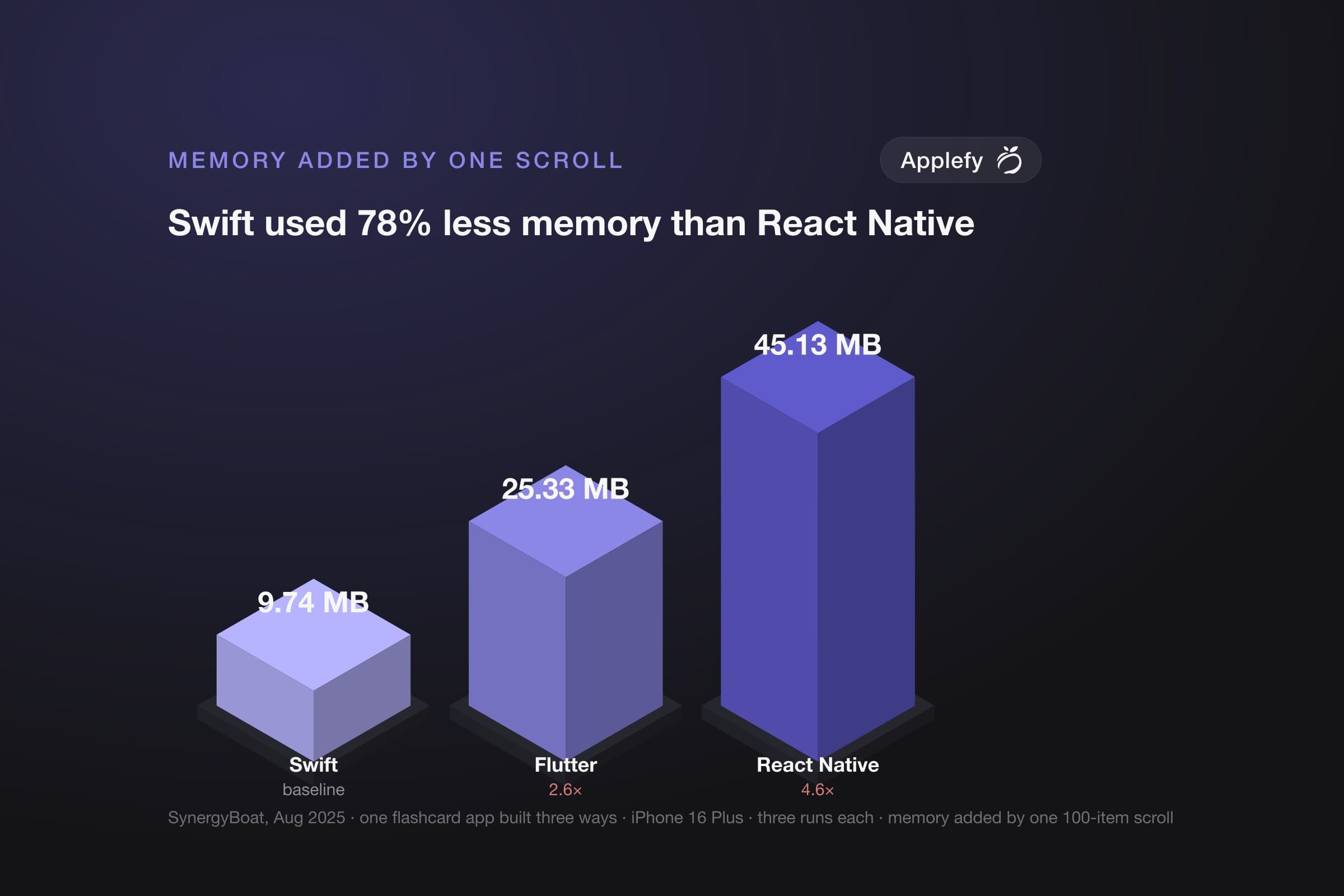
None of the above is abstract once an app is under memory pressure. In the only published iPhone test that builds the same app in native Swift, Flutter and React Native and measures all three the same way, one scroll through a 100-item list added 9.74 MB in Swift, 25.33 MB in Flutter and 45.13 MB in React Native — Swift used 62% less memory than Flutter and 78% less than React Native (iPhone 16 Plus, three runs each, August 2025). An iPhone doesn't slow a heavy app down — it terminates it, heaviest first, with no crash report to show for it. We wrote up what that costs commercially separately, and the full sourced comparison of what Flutter and React Native actually add in RAM and CPU, with every figure labelled by device and framework version, is here.
So when does "native" actually matter?
Efficiency is one input, and it's rarely the only one that decides a project.
- iPhone-only, and efficiency matters — background audio, camera, on-device AI, older hardware: native Swift is the straightforward answer, and with one platform it's also the cheaper one
- Widgets or Live Activities are on the roadmap: that part is Swift regardless of what the main app is built in — the memory ceiling those run under doesn't fit a bundled engine
- Both platforms, ordinary content, budget is binding: Flutter or React Native is a legitimate choice — one team, two platforms, and for a booking or shop app the memory gap may never reach a customer
- You already employ a React or Dart team: that's a real asset a benchmark doesn't capture. Shipping this quarter can outweigh being lighter next year
If you'd rather have this weighed against a specific product than in the abstract, talk to us — we build in all three and have nothing to sell you on the choice.
Frequently Asked Questions
Do native apps get kernel-level access on an iPhone?
No. Apple's security documentation says all third-party apps are sandboxed, whatever language they're written in. A Swift app reaches the operating system through the same system frameworks as a Flutter or React Native app — it just skips the extra layer in between.
Does Android still use Dalvik?
No. ART replaced Dalvik as Android's default runtime in Android 5.0, over a decade ago. ART runs a newly installed app through its interpreter and JIT compiler first, then compiles the code that actually runs hot ahead of time, in the background.
Does Flutter run in a virtual machine?
Not in production. Flutter's release builds are compiled ahead of time to machine code; the VM only runs during development, for hot reload. Flutter's real cost is the rendering engine it keeps resident in memory for the app's whole life.
How much more memory do Flutter and React Native use than Swift?
In SynergyBoat's iPhone 16 Plus test, one scroll through a 100-item list added 9.74 MB in Swift, 25.33 MB in Flutter and 45.13 MB in React Native. It's one vendor-published measurement of one scenario, not a rule for every app.
Why do new Apple features reach Swift apps first?
A new Apple API is in the SDK the day Apple ships it, so every Swift project can use it straight away. Flutter and React Native reach it only once someone writes a plugin that bridges to it — which can take days, or never happen.
Is cross-platform the wrong choice for a startup?
Not by default. For both platforms, ordinary content and a binding budget, Flutter or React Native is a legitimate choice: one team ships both apps. Native Swift is the straightforward answer for iPhone-only, efficiency-sensitive products, and for widgets or Live Activities.
Sources
Every architectural claim above comes from the platform's own documentation, not a summary of it.
The measurement
- SynergyBoat — "Flutter vs React Native vs Native: 2025 Performance Benchmark" (31 August 2025)The memory figures on the cover and above. iPhone 16 Plus, N=3, RSS growth over a 100-item scroll. Vendor-published. We use its memory arm only; its frame-time comparison measures different quantities against one budget.
First-party documentation
- Apple — "Security of runtime process in iOS, iPadOS, and visionOS"Source for "all third-party apps are sandboxed" and that apps reach other data only through services iOS explicitly provides.
- Apple — Human Interface GuidelinesApple's own design standard, referenced for the point about platform-native UI consistency.
- Apple — Core Data documentation
- Apple — Core Animation (QuartzCore) documentation
- Apple — Metal documentation
- Android Open Source Project — "Implement JIT compiler"Source for ART running the interpreter and JIT first, then using the JIT's profile to drive the on-device
dex2oatcompiler's ahead-of-time pass. - Android Developers Blog — "Android 5.0 Lollipop SDK and Nexus Preview Images" (October 2014)Source for "ART is enabled by default on API 21 & new Android devices with Android 5.0."
- Flutter — Architectural overviewSource for "for release, Flutter apps are compiled directly to machine code" and that the VM is a development-mode-only feature.
- Flutter — Platform channelsSource for how Flutter reaches a platform API outside its own core: a message passed to native code across a channel.
- React Native — Native platform codeSource for "your application may need access to platform features that aren't directly available from react-native," and that reaching them means writing native code.
For the measured cost of the engine each cross-platform framework keeps resident, see Native Swift vs Flutter vs React Native: RAM, CPU and Real Efficiency, Swift vs Flutter, or Swift vs React Native. For what that cost does to a session in production, see Why iPhones shut down heavy apps first.
Related articles
- Why Claude Max Runs Out So Fast — and How to Make It LastDevelopment
- Why iPhones Shut Down Heavy Apps FirstDevelopment
- Native Swift vs Flutter vs React Native: RAM, CPU and Real EfficiencyDevelopment